
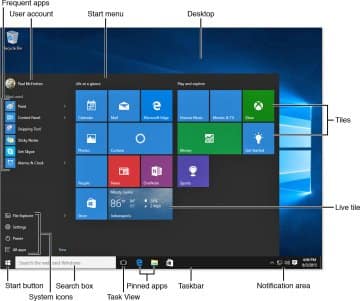
“Windows” is an operating system developed by Microsoft. It is one of the most popular operating systems for personal computers (PCs) and provides a graphical user interface (GUI) that allows users to interact with their computers using visual elements such as windows, icons, and menus. Here are some key points about Windows:

Versions: There are various versions of Windows, such as Windows XP, Windows 7, Windows 8, Windows 10, and the latest Windows 11. Each version brings new features, improvements, and security enhancements.

User Interface: Windows OS is known for its user-friendly interface. It includes a Start menu, taskbar, and a desktop where users can place shortcuts to their frequently used applications and files.

File Management: Windows Explorer (or File Explorer in later versions) allows users to manage files and folders on their computer. It provides a way to browse, organize, and manipulate files easily.

Applications: Windows supports a wide range of applications, from productivity software like Microsoft Office to various third-party applications for different purposes such as graphic design, video editing, and web browsing.

ย 

Settings and Customization: Users can customize their Windows experience by changing themes, adjusting system settings, and installing software to suit their needs.
Screenshot 32

Security: Windows includes built-in security features like Windows Defender, firewall protection, and regular updates to protect against viruses, malware, and other security threats.

Compatibility: Windows is compatible with a vast array of hardware and software, making it a versatile choice for many users.

If you have specific questions about using Windows on your PC, feel free to ask!


Discover more from anotherpassion.in

Subscribe to get the latest posts sent to your email.

4 responses to “The Elements of Windows”

  1. Associate director Avatar
    Associate director

    Excellent weblog here! Additionally your site so much up very fast!
    What web host are you the usage of? Can I get your
    associate link in your host?

  2. Associate director Avatar
    Associate director

    Excellent weblog here! Additionally your site so much up very fast!
    What web host are you the usage of? Can I get your
    associate link in your host?

  3. 66B Avatar

    Tแบกi 66B , ngฦฐแปi chฦกi cรณ cฦก hแป™i trแบฃi nghiแป‡m mแป™t thแบฟ giแป›i cรก cฦฐแปฃc thแปƒ thao phong phรบ vแป›i nhiแปu mรดn thแปƒ thao hแบฅp dแบซn nhฦฐ bรณng ฤ‘รก, bรณng rแป•, tennis vร  ฤ‘ua xe. Hแป‡ thแป‘ng cรก cฦฐแปฃc thแปƒ thao cแปงa nhร  cรกi nร y khรดng chแป‰ ฤ‘ฦกn thuแบงn cung cแบฅp cรกc lแปฑa chแปn cรก cฦฐแปฃc mร  cรฒn mang ฤ‘แบฟn cho ngฦฐแปi chฦกi nhแปฏng loแบกi kรจo cฦฐแปฃc ฤ‘a dแบกng, tแปซ kรจo chรขu ร, kรจo chรขu ร‚u cho ฤ‘แบฟn cรกc kรจo cฦฐแปฃc theo hiแป‡p, giรบp ngฦฐแปi chฦกi cรณ nhiแปu sแปฑ lแปฑa chแปn phรน hแปฃp vแป›i sแปŸ thรญch vร  chiแบฟn lฦฐแปฃc cรก cฦฐแปฃc cแปงa mรฌnh. TONY05-09

  4. 888slot Avatar

    Mแป™t trong nhแปฏng sแบฃnh game ฤƒn khรกch nhแบฅt tแบกi 888slot com nhแบฅt ฤ‘แป‹nh anh em khรดng nรชn bแป qua nแปฏa ฤ‘รณ chรญnh lร  bแบฏn cรก 888slot . Sแบฃn phแบฉm hแบฅp dแบซn vแป›i luแบญt chฦกi ฤ‘ฦกn giแบฃn, tฦฐฦกng tแปฑ nhฦฐ cรกch chฦกi bแบฏn cรก tแบกi cรกc trung tรขm thฦฐฦกng mแบกi, phรน hแปฃp, hแบฅp dแบซn mแปi ฤ‘แป‘i tฦฐแปฃng tham gia. Chแป‰ cแบงn chinh phแปฅc ฤ‘ฦฐแปฃc nhแปฏng chรบ cรก lร  anh em cรณ cฦก hแป™i thu vแป sแป‘ tiแปn thฦฐแปŸng khแปงng, rรบt vแป tร i khoแบฃn, nรขng cao cฦก hแป™i lร m giร u nhanh chรณng. TONY05-09

Leave a Reply

Your email address will not be published. Required fields are marked *

You might also like

Discover more from anotherpassion.in

Subscribe now to keep reading and get access to the full archive.

Continue reading